A Better Everyday PC.
Less background clutter. A more responsive setup. We configure your Windows PC remotely with our own iShopshanks Optimizer.
Essential Optimization · 45–60 minutes remotely · No Windows reinstall or BIOS tuning.
Fewer stutters
We go after the freeze that hits right as someone peeks you — not just the average number on screen.
Crisp mouse feel
We review software settings that may contribute to sluggish input response.
No Windows reinstall
Essential does not include formatting. We check restore-point availability before applying changes.
Honest scope
If your problem is hardware, we say so instead of selling you a service that won't fix it.
Average FPS Isn't the Problem.
A high average number still stutters if your frame times are unstable. What ruins a fight is the dip — the moment the frame hangs and your aim jumps. That is the part we go after.
The chart above is an illustration. The measurements below come from one PC; driver and Windows configuration differences are identified for each comparison.
What Actually Changed
Three selected comparisons from our test bench. These show observed results, not a forecast for your PC.
Windows 11 Pro · NVIDIA 595.97, stock versus optimized. No BIOS tuning or overclock listed in either configuration.
This run recorded less stutter and a small average FPS increase. A different driver comparison in the report produced a lower average FPS after optimization.
Stock Windows 11 Pro versus a clean install of a different official Windows edition with the optimizer. NVIDIA 581.57 in both; no BIOS tuning or overclock.
The measured difference includes the Windows installation and edition change. It cannot be attributed to the optimizer alone. Reinstallation is not included in Essential.
Stock Windows 11 Pro on NVIDIA 580.88 versus a clean install of a different official Windows edition on 581.57, with the optimizer. Multiple changes are combined.
The 262 → 393 FPS result belongs to this combined configuration change. It is not an Essential-only result or an expected gain for an older PC.
FrameView captures were 30 seconds in Valorant; LatencyMon measurements were separate 5-minute idle tests on the system above. Values are rounded for display. The report lists P1 FPS and 1% Low separately; these cards use its 1% Low column.
PASS / FAIL is the recorded LatencyMon verdict for that idle test, not a gaming stability guarantee. Peak DPC execution time is not mouse-to-screen input latency.
Results vary: on Windows 11 Pro with NVIDIA 581.57, average FPS changed from 327.2 to 316.8 after optimization (−3.2%), while reported stutter changed from 0.4% to 0.2%. Gains are not universal.
Comparisons involving a clean install also change the Windows edition; the third changes the driver as well. These are combined results. Essential does not include reinstallation or BIOS tuning. One test system and short captures cannot establish the result for your hardware or game.
Our software.
Your setup, handled.
Essential uses our own iShopshanks Optimizer, with a remote session to review your PC, choose suitable changes, and check the result together.
- Review background apps and unnecessary system clutter
- Configure Windows for your gaming and everyday use
- Check the applied changes before handing your PC back
No Windows reinstall or BIOS tuning is included. If the issue needs repair beyond this service, we explain that before booking.
Explore Essential →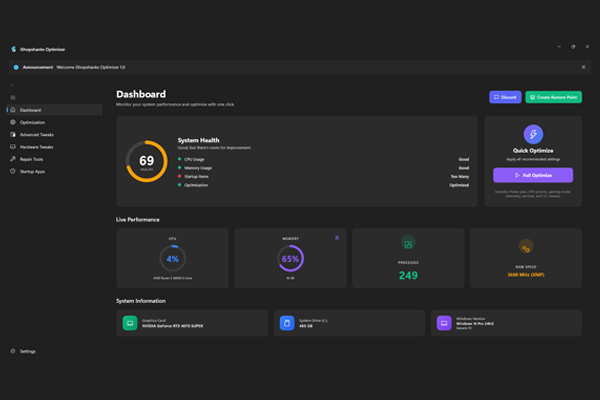
We don't touch what we don't need to.
We review suitable changes with you and check that a restore point can be created before applying them. Keep a separate backup of important files. Essential focuses on Windows configuration; it does not include formatting or BIOS tuning.
- Restore point created before any change
- No formatting or BIOS tuning in Essential
- Changes reviewed before they are applied
Service Menu
Start with Essential Optimization. Optional monthly maintenance is available for ongoing checkups.
Join Discord, select the ID rolethe EN role, then open a ticket for PC Optimization. Confirm your package, compatibility, and schedule with us before payment.
International payments: PayPal.
Essential Optimization
One-time · Remote setup · No Windows reinstall
Get EssentialFor those who feel their PC getting sluggish, FPS dropping in fights, or mouse feeling "floaty" (input lag) — but don't want the hassle of reinstalling.
- A more responsive setup. We review settings and background activity that may contribute to sluggish response.
- Target avoidable interruptions. We investigate software-related causes of hitching; hardware and server limits still apply.
- Less unnecessary background activity. We review unwanted apps and startup items with you.
- A cleaner daily workflow. Suitable changes are selected for your PC and how you use it.
- Windows health checks. We run appropriate repair steps and explain any issues that remain.
- Remote session via AnyDesk or UltraViewer
- 45–60 minutes, done in one sitting
- No formatting or personal-file cleanup is included
- Restore point created before we start
- Applied with our own in-house tool, not a downloaded script
Ultimate Optimization is currently unavailable. We are not accepting reinstall or BIOS-tuning bookings.
Monthly Maintenance
Per month — keep your PC running optimal
SubscribeMonthly checkup to keep your PC in top shape. Re-apply optimizations when Windows Update resets your settings, driver updates, and full cleanup.
- Monthly remote checkup (20–30 minutes)
- Re-apply optimizations if needed
- Driver updates (GPU, chipset, audio)
- System cleanup (temp files, cache)
- Priority support via Discord
- You have already had your PC optimized and want regular checkups
- Windows Update keeps resetting your settings
- You'd rather not think about maintenance at all
⚠️ Optimization is NOT a fix for...
We would rather turn down a booking than take your money for something that won't work. If any of these describe your PC, optimization is not the answer.
Hardware issues
- Overheating or thermal throttling that needs diagnosis
- Suspected faulty memory
- SSD/HDD dying (bad sectors, slow speeds)
- Insufficient PSU (undervoltage, random restarts)
Severely corrupted software
- Windows infected with heavy viruses
- Severe Windows damage that repair tools cannot resolve
- Registry broken beyond repair
Hardware faults need diagnosis or repair first. Severe software damage may need a reinstall outside Essential. We assess suitability before accepting a booking.
How It Works
Open Ticket
Open a PC Optimization ticket on Discord and tell us what you want to improve.
System Info
Screenshot CPU-Z & CrystalDiskInfo so we can check your hardware condition.
Payment
Confirm the scope and an available time in your ticket, then arrange payment.
Session
Allow around 45–60 minutes for your Essential remote session.
Done!
Review the changes together, then get 7 days of free support for your setup.
What Our Community Says
Join 11,000+ members in our community.
Open a ticket, ask about your specs, and book a session that fits your schedule.
Get Started on Discord →